Bring your own IP (BYOIP)
When you create an Internet Service you can select if you want to use Public IP addresses from Wanscale. Each of those addresses is a Public IP service. Another possibility is to Bring Your Own public IP addresses (BYOIP).
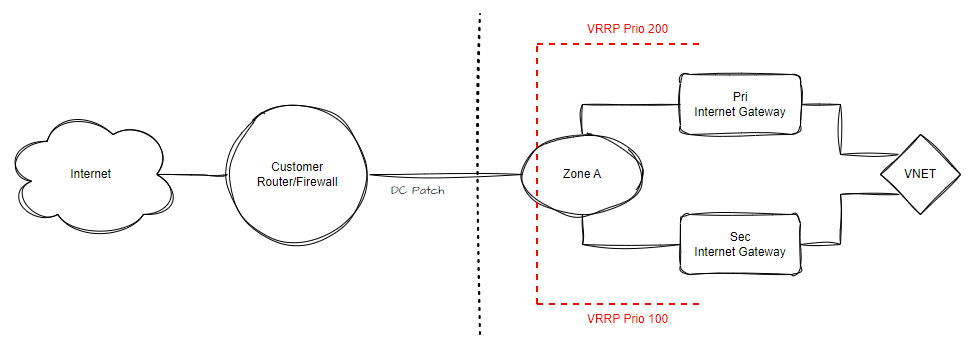
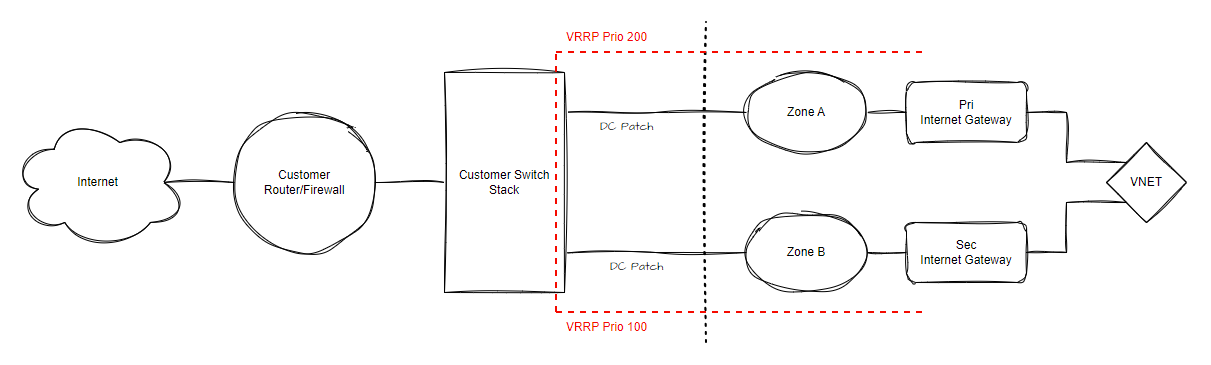
BYOIP allows you to utilize your own public IP infrastructure by connecting it to the Wanscale Platform via single or redundant DC Ports. Once connected, you can define specific IP prefixes to be used for Internet Services across the platform.
Connection Architectures
Single Port Setup
Redundant Port Setup
Warning
IP Sizing Warning: To facilitate connectivity, three (3) IP addresses are required for VRRP on the Internet Gateways. Ensure your BYOIP prefix is sized appropriately to accommodate these system requirements.
Overview
The overview is a lean status and inventory page. You see the service, its prefixes, and what still needs attention.
Click Actions, then Manage prefixes, to work with the prefixes you brought in. Addresses from those prefixes are Public IP services, which you manage from the Internet Service.
Ordering Bring You Own IP
Follow these steps to order Bring You Own IP via the Wanscale Control Center:
- Navigate to the Home page of the Wanscale Platform.
- Click the Add Service button.
- Select Bring You Own IP from the service list.
- Click Go to service form.
- Complete the following fields in the service form:
- Label: Enter a descriptive name for the BYOIP.
- Tags (Optional): Add metadata for internal organization.
- Redundant:
- Unchecked - Select a single DC Port (optional VLAN configuration).
- Checked - Select two DC Ports (optional VLAN configuration).
- Add IP Prefix: Click this button to define your address space.
- Prefix: Specify the prefix in CIDR notation (e.g., 1.2.3.0/24).
- IP Configuration: Specify the gateway IP address
- Click Submit.
Info
Management: Once the service is created, you can manage the specific IP addresses for this prefix as Public IP services, from the Internet Service.
Note
Applying Changes: Like all networking services in Control Center, your new BYOIP will not be active until you deploy the changes. See Workflows and Applying Changes.