Private SD-WAN
The Wanscale Platform allows you to integrate existing Private SD-WAN environments, such as an E-Line or E-LAN from another provider. This ensures seamless connectivity between your legacy infrastructure and your modern cloud/SD-WAN environment.
Note
Custom Connectivity: While three standard connection methods are outlined below, please Contact Wanscale Support to discuss custom requirements for your specific network.
Warning
Restriction: You may connect only one Private SD-WAN environment per VNET.
Overview
The overview is a lean status and inventory page. You see the service, its ports, and what still needs attention.
Click Actions, then Manage ports, for day-to-day port work.
Connection Architectures
1. Single Port
This setup connects a single node from your Private SD-WAN to the Wanscale Platform.
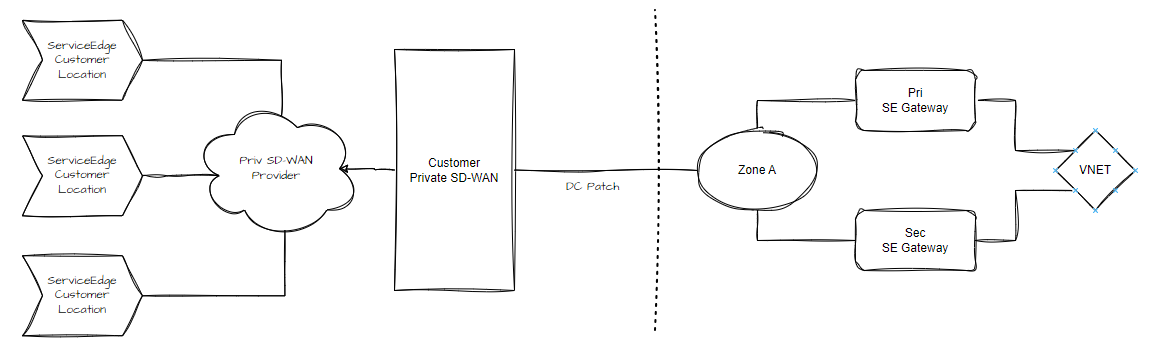
- Requirement: Requires one DC Port.
- Description: You can connect multiple Service Edges to the Platform via this single DC Port (with or without a VLAN tag).
2. Redundant Port
This setup provides high availability by connecting two nodes from your Private SD-WAN to the Platform.
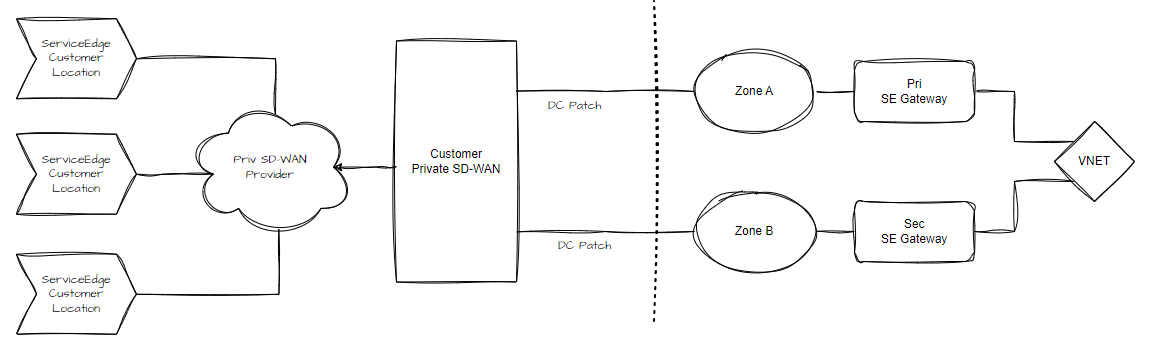
- Requirement: Requires two DC Ports.
- Description: This creates two distinct entry points (with or without VLAN tags) that multiple Service Edges can utilize for redundancy.
3. Transparent (NNI)
A transparent setup utilizes existing Network-to-Network Interfaces (NNI) that Wanscale maintains with major providers.
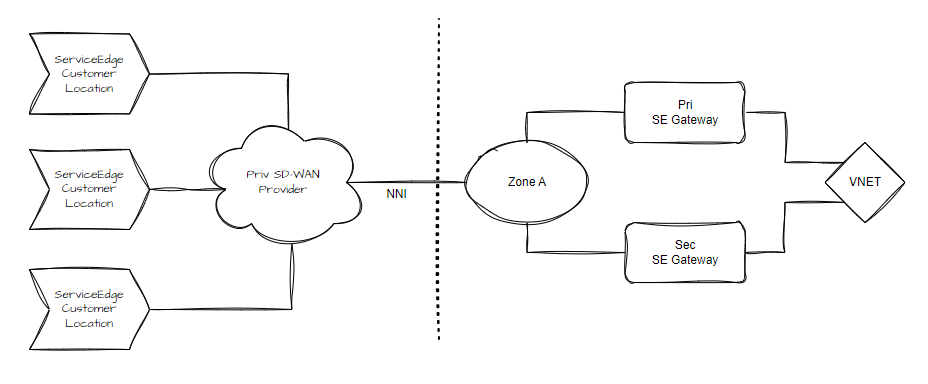
- Mechanism: You order an Ethernet Virtual Circuit (EVC) from your provider to the Wanscale NNI.
- ServiceKeys: The NNI VLAN is linked to a ServiceKey, which you use to attach the connection to the Platform.
- Example: If you receive three ServiceKeys, you can connect three distinct Service Edges via the provider’s network.
Ordering a Private SD-WAN
Follow these steps to order a new Private SDF-WAN via the Wanscale Control Center:
- Navigate to the Home page of the Wanscale Platform.
- Click the Add Service button.
- Select Private SD-WAN from the service list.
- Click Go to service form.
- Complete the following fields in the service form:
- Label: Enter a descriptive name for the Private SD-WAN.
- Tags (Optional): Add metadata for internal organization.
- Virtual Network: Select the VNET this Private SD-WAN connects to.
- Setup:
- Single - Select a single DC Port (optional VLAN configuration).
- Redundant - Select two DC Ports (optional VLAN configuration). When you choose Redundant, the primary and redundant DC Ports must be different. If you pick the same port twice, Control Center explains that Primary and redundant ports must be different.
- Transparent - No DC Port configuration is required.
- Type: Automatically set to Layer 2.
- MTU: Specify the MTU size used by your Private SD-WAN provider.
- IP Configuration: By default, the VNET prefix is used. Uncheck this box if you wish to specify a custom IPv4 prefix for Private SD-WAN links.
- Click Submit.
Connecting a Service Edge to Private SD-WAN
Once the Private SD-WAN is connected to the VNET, you must configure the relevant Service Edges to recognize the new connection domain.
- Navigate to the Home page and select the desired Service Edge.
- Expand Interfaces in the left sidebar and click WAN.
- Click the Ellipses (...) in the Actions column for the target port and click Edit WAN interface.
- In the right sidebar, complete the following:
- Domain: Select the appropriate WAN connection type:
- Public: For standard internet services.
- Private: For Private SD-WAN via Single or Redundant ports.
- Transparent: For connections utilizing a ServiceKey.
- Name: Enter a descriptive name for the interface.
- Bandwidth: Enter the speed in Mbps (used for traffic-shaping).
- MTU Size: Enter the MTU Size in bytes.
- Upstream carrier type/reference: Select the provider type to enable enhanced platform polling.
- Domain: Select the appropriate WAN connection type:
- Click Save.
Note
Applying Changes: Like all networking services in Control Center, your new Private SD-WAN will not be active until you deploy the changes. See Workflows and Applying Changes.